What real value from a Business Operating System SuperApp looks like
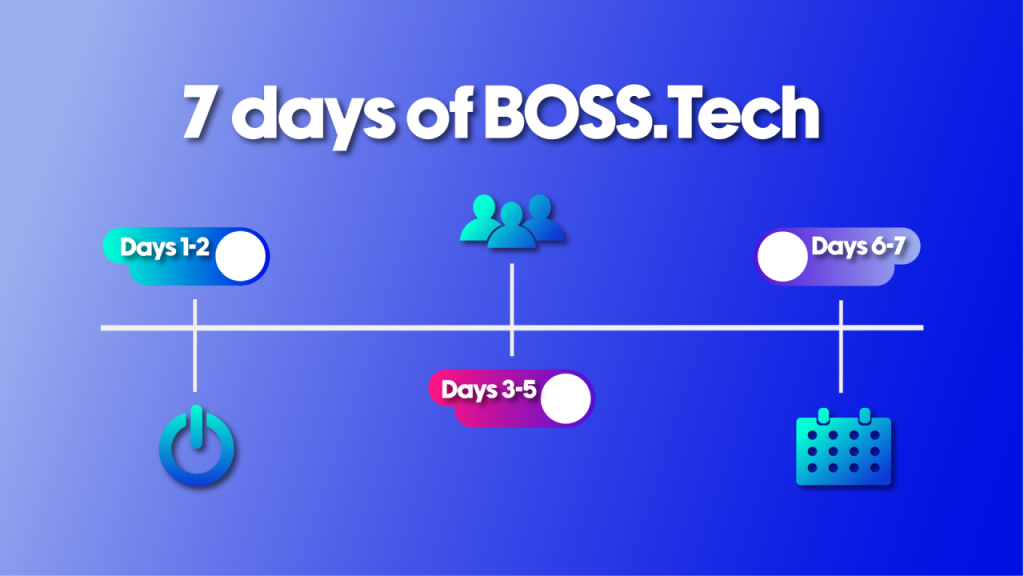
Your First 7 Days with BOSS.Tech
Most small businesses do not break all at once.
They get buried in fragments.
A calendar in one place. Messages in another. Invoices somewhere else. Customer details split across tools, inboxes, and team memory.
At first, that feels manageable.
Then growth shows up.
More leads. More follow-up. More appointments. More invoices. More chances for something small to slip through.
That is usually the moment when businesses think they need more hustle.
What they actually need is more connection.
BOSS.Tech was built for that shift. It is an AI-powered Business Operating System SuperApp designed to connect the tools you already use, sync data across them, and help you manage messaging, scheduling, contacts, payments, and workflows in one connected system. BOSS.Tech’s own FAQ describes it as replacing app-switching with one connected operating layer for the business. (BOSS.Tech)
The goal of your first 7 days in BOSS.Tech is not to turn on everything.
It is to connect the parts of your business that create momentum first.
Here is how to do that.
Days 1 to 2. Set the foundation
Before you touch automations, AI workflows, or advanced use cases, start with the basics.
Your first job is to make BOSS.Tech your real operating home.
What to do in BOSS.Tech these days
1. Create your account and add your company BOSS.Tech’s official getting-started guidance is simple: sign up, create your account, add your company, and then connect the services you already use.
2. Connect your core services Start with the platforms that already carry the most important parts of your business. BOSS.Tech specifically highlights integrations like Google Calendar, QuickBooks, Zendesk and Socials and once those services are connected, BOSS.Tech starts syncing the data so you can run messaging, scheduling, and workflows from one place.
3. Set up your company structure and access If you have teammates, this is the week to decide who needs access to what. BOSS.Tech company owners can grant limited access to employees and customers using permissions and People Sync-related controls.
4. Get your BOSS Card ready This is a small setup step that can pay off quickly. BOSS.Tech automatically creates a BOSS Card when you log in, and you can create separate BOSS Cards for each company. It can be shared by QR code, text, email, and socials.
Why these days matters
These are the days where you stop treating BOSS.Tech like “another app” and start making it the place where your business gets organized.
You are not trying to perfect every workflow yet. You are trying to reduce fragmentation.
Because if the foundation is messy, every step after this gets harder
Days 3 to 5. Clean up your people and conversations
Once the company is set up, your next move is to make sure BOSS.Tech actually knows who your people are and where your communication lives.
A lot of businesses think they have a follow-up problem.
Usually, they have a context problem.
The same person exists in multiple tools. One version has the right number. Another has the right email. A teammate has extra context in a text thread. Someone else answered them from a ticketing platform.
That is exactly the kind of mess BOSS.Tech is meant to reduce.
What to do in BOSS.Tech these days
1. Review synced contacts and people records – in BOSS.Tech data is not just synced, but structured and made usable across services so businesses are not searching in five places for one answer.
2. Use People Sync to start checking unified records – with People Sync a person is AI-synced across your integrations so you can see their data in one place, and correct or unlink records if needed.
3. Bring communication into one place – BOSS.Tech centralizes business conversations so users can manage them in one place instead of jumping between apps, with support for channels like SMS, email, support tickets, and social messaging depending on what is connected.
4. Decide what counts as your primary communication flow – Do not overcomplicate this. The goal is simply to stop losing context between channels.
Why these days matter
When your people and conversations are cleaner, your team moves faster.
They stop asking: Who is this? What happened last? Where did that message come in? Who followed up?
That is the beginning of a more connected business.
Days 5 to 7. Connect your calendar and operational flow
Now that your people and communication are more organized, it is time to tighten the part of the business that creates motion.
The calendar.
Most teams treat calendar as admin. It is not.
Calendar is commitment. Calendar is follow-through. Calendar is whether the next step actually happens.
BOSS.Tech’s Calendar syncs all your calendars in one place and links with bulk texting, other integrations and with BOSS Bot. It also allows multiple company calendars to be added through calendar integrations.
What to do in BOSS.Tech these days
1. Connect your calendar integrations – If Google Calendar is the starting point, connect it first. If you have more than one company calendar, add those too.
2. Make sure your calendar is connected to real business activity – Do not let scheduling float as a separate system. Tie it back to customer records, conversations, and follow-up.
3. Start using reminders and scheduling with context – BOSS.Tech calendar works seamlessly with all integrations like Money, Products and bulk texting. That matters because a calendar becomes far more valuable when it does more than hold time.
4. Use BOSS.Tech to reduce missed handoffs – This is the week to ask: when something gets scheduled, does the right person know, and can they act without searching five tools first?
Why these days matter
This is usually when BOSS.Tech starts feeling less like setup and more like a real operating system.
Because once your calendar is connected to people and communication, the next steps in the business stop living in random places.
What to do in BOSS.Tech this day
1. Connect accounting workflows – BOSS.Tech specifically supports integrations like QuickBooks and positions Accounting as part of the connected system for payments, messaging, and workflows.
2. Start tightening reminders and follow-up – At this point, your business should be better positioned to use one system for communication, scheduling, and payment-related workflows instead of chasing them manually across tools. BOSS.Tech is reducing silos and centralizing those actions.
3. Use BT Guide when you need feature help – BT Guide BOT can help with product-specific questions like adding employees, finding where to send a bulk text, or understanding People Sync.
4. Start using AI where it saves time, not where it adds noise – This is the right point to lean into AI assistance for drafting, organization, and next-step support, because the underlying systems are cleaner. Salesforce reported in 2025 that 91% of SMBs using AI say it boosts revenue. (Salesforce)
Why this day matters
This is where BOSS.Tech should start earning its keep.
Not because every feature is live. Because your business is spending less time switching, searching, and remembering.
What success looks like after 7 days
After your first 7 days in BOSS.Tech, you do not need perfection.
You need proof that the business is getting more connected.
You should be able to answer yes to most of these:
Are our core tools connected inside BOSS.Tech?
Are our contacts and conversations easier to understand?
Is our calendar more operational, not just more full?
Can the team get context faster without jumping between systems?
If yes, week one worked.
Because the point of BOSS.Tech is not to add another layer of software.
It is to reduce the gaps between your people, your messages, your calendar, your payments, and your workflows so the business runs with more continuity.
That is the upgrade.
Not more activity. More connection.
If your business feels scattered, your first 7 days with BOSS.Tech should not be about learning every button. They should be about connecting the systems that keep revenue, communication, and follow-through moving.
Start with your company. Connect your services. Clean up your people. Tie in your calendar. Tighten follow-up. Then let BOSS.Tech do what it was built to do.
Business. Easier.